Version 1.0.6 · Windows, macOS and Linux

Chasm: Diffusion delay plugin, made with Korzana

Chasm is a diffusion delay made with Korzana, inspired by their own effect chains. It runs your sound through chains of allpass filters: short Delay settings blur and soften transients, longer ones smear into audible, diffused delays.

Low and high cuts, Brightness, Haas, Width and a built-in MakeItLoud stage shape the result; with the diffusion itself, that is seven effects in one plugin.

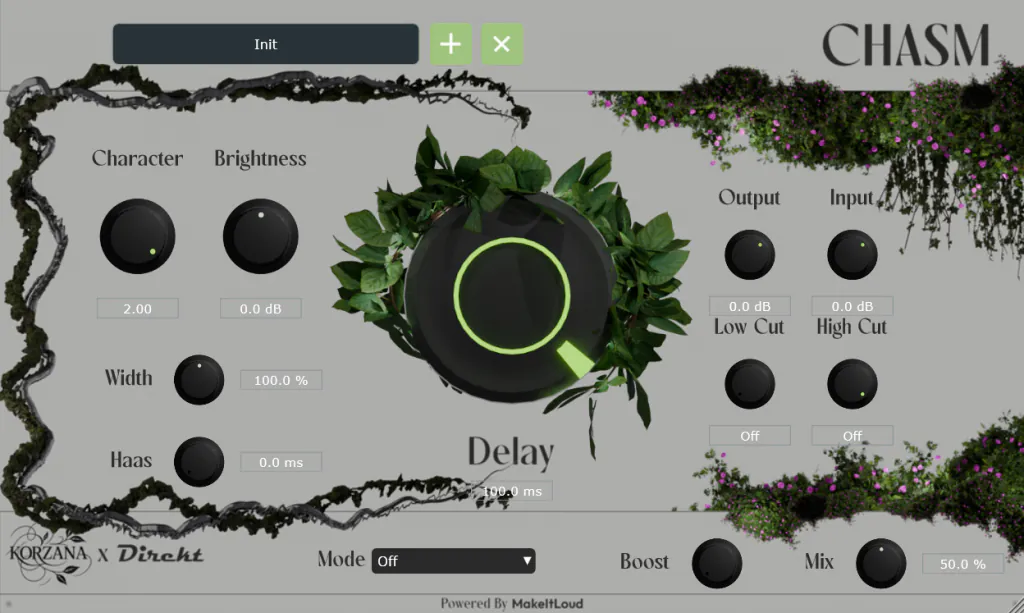
The Chasm plugin window: a large Delay dial in the centre, Character, Brightness, Width and Haas controls on the left, Input, Output, Low Cut and High Cut on the right, framed in vines.

What Chasm does

Chasm has two halves: a diffusion network that blurs or delays the sound, and the tone and stereo stages that shape what comes out of it. Parameters are smoothed for automation.

Blur and smear

Delay sets how long the allpass chains hold your sound, from 1 to 100 ms. Low settings give tight blurs that soften transients; high settings give longer, more noticeable delays. Character sets the feedback of the filters: lower values reduce the blur, and above 1 it turns metallic and resonant.


Tone

Brightness is a high shelf after the diffusion that brings back the top end the allpass filters soften. Low Cut and High Cut filter the wet signal, which helps when Mix is below 100% and low end starts to clash with the dry sound.

Stereo

Haas delays one channel of the wet signal by up to 5 ms; at 0 it is off. Width then scales the side signal, from 0% (mono) through 100% (unchanged) to 200%. Both come after the delay, so Width has some effect even on a mono source.

Built-in MakeItLoud

The last stage is a built-in version of MakeItLoud: a compressor, a saturation stage driven by Boost, then a second compressor. It is off by default; choose a mode from the Mode menu to switch it on.

Presets

The Windows and macOS installers add 31 factory presets in four categories: Small, Medium, Large and Misc. Korzana Classic, Slight Vocal Widener, Clean Widened Percs, Arp Ambience and Background Drones are among them. The Linux download contains the plugin files only, without the factory presets.

The preset manager sorts your own presets into categories you create inside the plugin, so there are no folders to dig through.

Controls

What each control does.

Chasm controls
Control What it does
Delay 1 to 100 msLength of the smear: tight blur at the bottom, audible delays at the top.
Character 0.1 to 2.0Filter feedback. Above 1 it turns metallic and resonant.
Brightness −12 to +12 dBHigh shelf after the diffusion.
Low Cut Off, or up to 20 kHzTakes low end out of the wet signal.
High Cut Off, or down from 20 kHzTakes high end out of the wet signal.
Haas 0 to 5 msDelays one channel of the wet signal; 0 is off.
Width 0 to 200%Side level after Haas; 100% leaves it unchanged.
Mode Off, Clean, Further, CrunchySwitches the built-in MakeItLoud on; Off by default.
Boost Drive into MakeItLoud's saturation; it adds harmonics.
Mix 0 to 100%Wet and dry balance. Below 100% the two can phase, which brings out the metallic sound.
Input and Output −48 to +24 dBGain into and out of the plugin.

Specs and requirements

What you need, and what you get.

Chasm specifications and system requirements
Version1.0.6
FormatsVST3 and CLAP on Windows, macOS and Linux; AU on macOS. No standalone app.
SystemsWindows 10 or newer (64-bit), macOS 10.15 or newer, Linux (x86_64)
Presets31 factory presets (Windows and macOS), plus your own
ActivationIn the plugin, through its activation screen
Made withKorzana

Read the Chasm user guide on docs.direktdsp.com

Questions about Chasm

Short, straight answers.

Is Chasm a reverb or a delay?

A diffusion delay. Chains of allpass filters smear your sound: low Delay settings give tight blurs, high ones longer, more noticeable delays.

Does Chasm run on Linux?

Yes, as VST3 and CLAP, the same as on Windows; macOS adds AU. There is no standalone app, and the Linux download does not include the factory presets.

Why can't I open Chasm as an instrument?

Chasm is an effect, not an instrument: load it in an effect slot on a track, as you would a delay. Some hosts, FL Studio among them, will not open it as an instrument.

Where are my presets saved?

On Windows in C:\Users\Public\Documents\DirektDSP\Chasm\Presets\ and on macOS in /Users/Shared/DirektDSP/Chasm/Presets/. Each category you create is a folder inside it.

More from DirektDSP

  • Free · Compression and distortion plugin

    MakeItLoud

    Free loudness: compress, then saturate

  • Guitar to MIDI plugin

    Polygraph

    Every note, on the record.

All DirektDSP plugins