
Free · Version 1.0.0 · Windows and macOS
MakeItLoud: Free compression and distortion plugin
MakeItLoud is a free plugin for making sounds louder: a compressor evens out the level, then a saturation stage driven by one Boost knob adds drive and rounds off the peaks. Choose one of three compressor modes, or set your own threshold, ratio, attack and release.
Free
MakeItLoud comes in the free bundle with Fuzzboy and Hot Potato, and the button adds the whole bundle to your cart. See what's in the free bundle
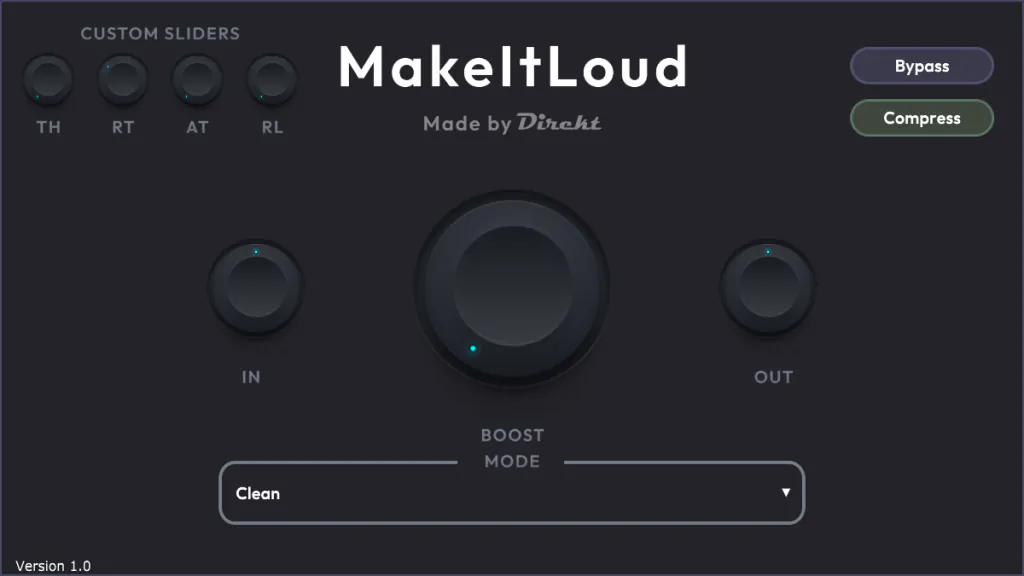
What MakeItLoud does
Your signal goes through the compressor first, then into the saturation stage, where In and Boost set how hard it is driven. The saturation is a smooth curve that rounds peaks off rather than cutting them flat. Out sets the final level.
The Compress button switches the compressor off and leaves only the saturation. Bypass takes out the whole plugin, in and out gain included. A version of MakeItLoud is built into Chasm.
Compressor modes
The mode menu has three fixed settings and a custom one. Your DAW's automation list names the three fixed modes Drums, Synths and Vocals.
- Clean: threshold −20 dB, ratio 4:1, attack 10 ms, release 80 ms
- Push it Further: threshold −15 dB, ratio 6:1, attack 75 ms, release 50 ms
- Loud n' Crunchy: threshold −8 dB, ratio 5:1, attack 100 ms, release 200 ms
- Custom Settings: the TH, RT, AT and RL knobs set threshold (0 to −70 dB), ratio (up to 10:1), attack (10 to 100 ms) and release (10 to 300 ms)
Controls
What each control does.
| Control | What it does |
|---|---|
| In | Level into the saturation stage. |
| Boost 1 to 10 | How hard the saturation is driven. |
| Out | Final output level. |
| Mode Clean, Push it Further, Loud n' Crunchy, Custom Settings | Compressor settings, listed above. |
| TH, RT, AT, RL | Threshold, ratio, attack and release, used only in Custom Settings. |
| Compress | Switches the compressor on or off. On by default. |
| Bypass | Takes out the whole plugin. |
“MakeItLoud is your one-stop shop for adding punch and loudness to your signals.”
Specs and requirements
What you need, and what you get.
| Version | 1.0.0 |
|---|---|
| Formats | VST3 on Windows; AU and VST3 on macOS |
| Systems | Windows (64-bit); macOS 10.13 or newer, Apple Silicon and Intel |
| Price | Free |
Read the MakeItLoud user guide on docs.direktdsp.com
Questions about MakeItLoud
Short, straight answers.
Is MakeItLoud free?
Yes, on its own or in the free bundle with Fuzzboy and Hot Potato.
Which systems does it run on?
Windows, as a 64-bit VST3, and macOS 10.13 or newer, as an AU and a VST3 for Apple Silicon and Intel. There is no Linux version yet.
Can I save presets?
Not inside the plugin: version 1.0 has no preset bar. It saves all its settings for your DAW, so they are kept with the project and can go into your DAW's own plugin presets. The three modes and Custom Settings are the starting points.
Is it the same MakeItLoud that is in Chasm?
Chasm has its own version built in as its last stage, switched on from Chasm's Mode menu and driven by its Boost knob. It has no Custom Settings.
Get MakeItLoud free
Free
MakeItLoud comes in the free bundle with Fuzzboy and Hot Potato, and the button adds the whole bundle to your cart. See what's in the free bundle